
How to Add M3U Playlist in IPTV Smarters Pro
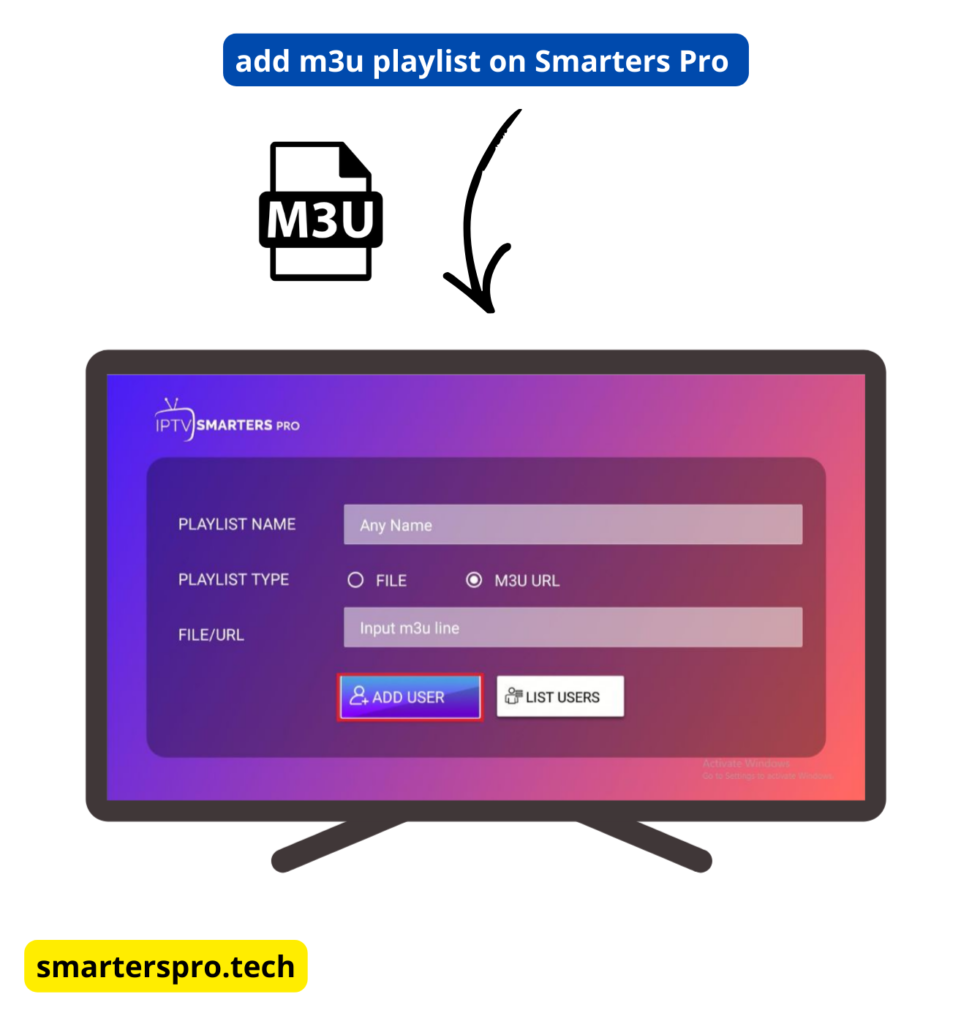
How to Add M3U Playlist in IPTV Smarters Pro (Step-by-Step Guide)
Adding an M3U playlist in IPTV Smarters Pro is a simple way to access IPTV content when Xtream Codes API is not available. Using an M3U URL, the app can load live TV channels and on-demand content provided by your IPTV service.
This guide explains how to add an M3U playlist in IPTV Smarters Pro, what you need before starting, and how to fix common issues.
Important: IPTV Smarters Pro is a media player only. It does not provide channels, playlists, or subscriptions.
What Is an M3U Playlist?
An M3U playlist is a file or URL that contains streaming links provided by an IPTV service. When added to IPTV Smarters Pro, it allows the app to display available channels and on-demand content.
What You Need Before Adding an M3U Playlist
Before you start, make sure you have:
-
M3U Playlist URL from your IPTV provider
-
EPG URL (optional, if provided)
-
Stable internet connection
Step-by-Step: Add M3U Playlist in IPTV Smarters Pro
Step 1: Open IPTV Smarters Pro
Launch the IPTV Smarters Pro app on your device and accept the terms and conditions.
Step 2: Choose M3U Login Option
On the login screen, select Login with M3U Playlist.
Step 3: Enter Playlist Details
Fill in the required fields:
- Playlist Name (any name you choose)
- M3U URL (provided by your IPTV service)
EPG URL
(optional)
Make sure there are no extra spaces when pasting the URLs.
Step 4: Add User
Click Add User and wait a few seconds while the app loads the playlist data.
Once complete, available channels and content will appear in the app.
Common M3U Playlist Issues & Fixes
Playlist Not Loading
- Check the M3U URL for typing or copy errors
- Ensure your internet connection is stable
No EPG Showing
- EPG availability depends on your IPTV provider
- Add the correct
EPG URL
and refresh EPG data from app settings
Channels Not Updating
- Restart the IPTV Smarters Pro app
- Reload the playlist from the app settings
M3U Playlist vs Xtream Codes API
| Feature | M3U Playlist | Xtream Codes API |
|---|---|---|
| Easy Setup | Yes | Yes |
| Auto EPG | Sometimes | Yes |
| Organized Content | Limited | Better |
| Recommended | If needed | Best |
Xtream Codes API
is recommended if your IPTV provider supports it.
Is Using an M3U Playlist Safe?
Yes. Adding an M3U playlist is safe because IPTV Smarters Pro only acts as a media player. Always ensure your IPTV service complies with local laws and regulations.
Frequently Asked Questions – M3U Playlist in IPTV Smarters Pro
What is an M3U playlist in IPTV Smarters Pro?
An M3U playlist is a URL or file provided by an IPTV service that contains streaming links. IPTV Smarters Pro uses this playlist to load live TV channels and on-demand content.
Does IPTV Smarters Pro provide M3U playlists?
No. IPTV Smarters Pro does not provide any playlists, channels, or content. You must add an M3U playlist from your own IPTV service provider.
Is an M3U playlist better than Xtream Codes API?
Xtream Codes API is generally better because it offers automatic EPG, improved organization, and easier management. M3U playlists are useful when Xtream login is not available.
Why is my M3U playlist not loading in IPTV Smarters Pro?
This usually happens due to an incorrect or expired M3U URL, internet connection issues, or server problems on the IPTV provider’s side.
Can I add an EPG URL with an M3U playlist?
Yes. If your IPTV provider supplies an EPG URL, you can add it during setup or refresh it later in the app settings.
Is it safe to use an M3U playlist in IPTV Smarters Pro?
Yes. IPTV Smarters Pro is only a media player. Users are responsible for ensuring their IPTV service complies with local copyright laws.
Can I use the same M3U playlist on multiple devices?
Yes, but the number of simultaneous connections depends on the rules set by your IPTV provider.
What should I do if channels don’t update?
Try restarting the app, reloading the playlist from the app settings, or checking with your IPTV provider to confirm the playlist is still active.
Is IPTV Smarters Pro free when using M3U playlists?
Yes. IPTV Smarters Pro is free to use with M3U playlists. A premium version is optional and offers additional features such as ad-free viewing.
Final Thoughts
Learning how to add an M3U playlist in IPTV Smarters Pro gives you flexibility when Xtream Codes API is not available. With the correct playlist URL, setup takes only a few minutes and allows you to start streaming quickly.