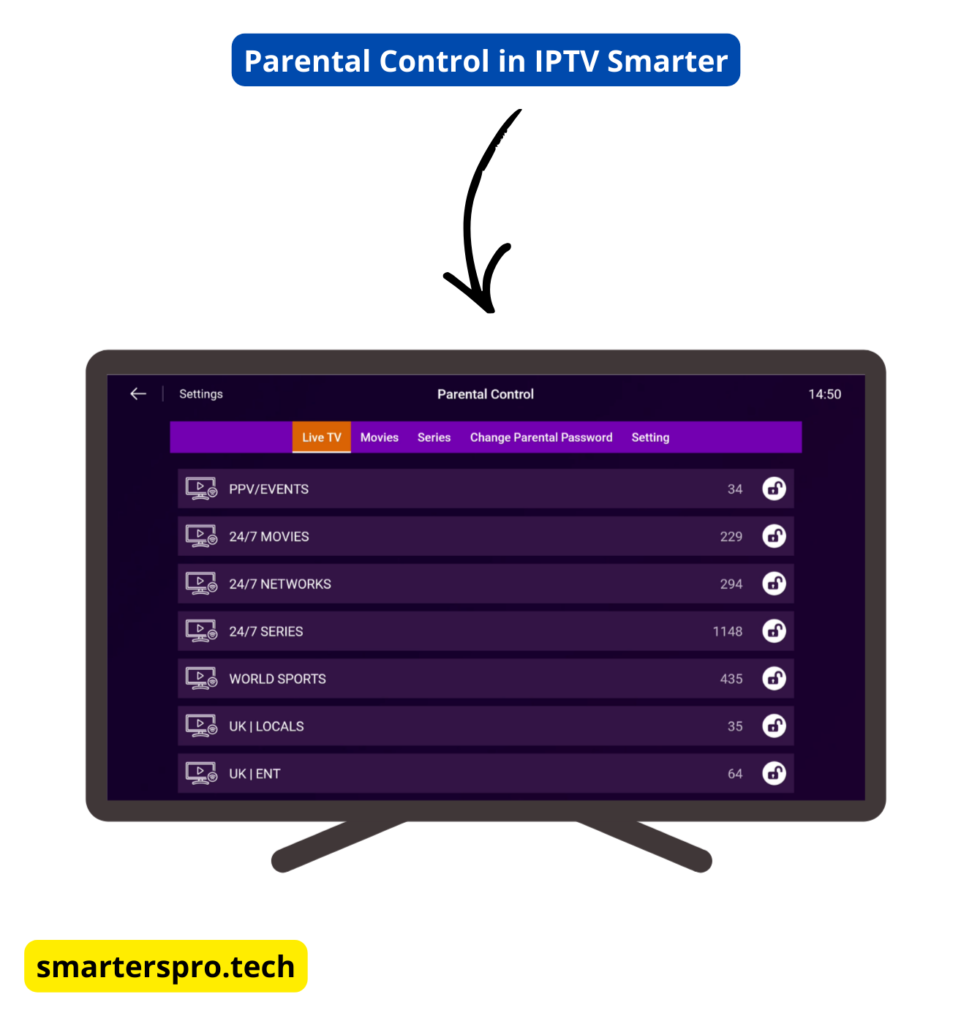
Enabling Parental Control in IPTV Smarters Pro allows you to restrict access to adult content, specific categories, or app settings using a PIN code. This feature is especially useful for families who want to create a safer viewing experience for children.
In this guide, you’ll learn how to enable and manage parental control in IPTV Smarters Pro, change the PIN, and resolve common issues.
Important: IPTV Smarters Pro is a media player only. It does not provide channels or content. Parental control options depend on how your IPTV service is structured.
Parental Control is a built-in feature that lets you:
- Lock adult or sensitive categories
- Restrict access to app settings
- Protect content with a PIN code
Once enabled, restricted sections cannot be accessed without the correct PIN.
Step-by-Step: Enable Parental Control in IPTV Smarters Pro
Step 1: Open IPTV Smarters Pro
Launch the IPTV Smarters Pro app on your device.
Step 2: Go to Settings
From the main dashboard, select Settings.

Step 3: Open Parental Control
Inside the Settings menu, choose Parental Control.

Step 4: Set a PIN Code
Create a 4-digit PIN that will be required to access restricted content.
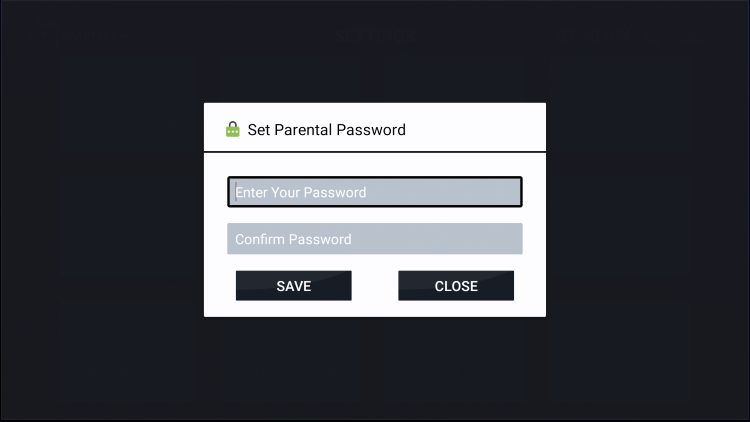
Tip: Choose a PIN that children cannot easily guess.
Step 5: Enable Parental Control
Turn on Parental Control and confirm your PIN.
Once enabled, restricted categories and settings will be locked until the correct PIN is entered.
Is Parental Control Free in IPTV Smarters Pro?
Yes. Parental Control is available in the free version of IPTV Smarters Pro. No premium upgrade is required to use this feature.
Is Parental Control Safe and Reliable?
Yes. Parental Control works locally within the app and does not affect your IPTV subscription. Its effectiveness depends on how your IPTV service organizes categories and content.
Frequently Asked Questions – Parental Control in IPTV Smarters Pro
What is parental control in IPTV Smarters Pro?
Parental control is a built-in feature that lets you restrict access to adult content, specific categories, or app settings using a PIN code.
Is parental control available in the free version of IPTV Smarters Pro?
Yes. Parental control is included in the free version of IPTV Smarters Pro. No premium upgrade is required.
How do I lock adult channels in IPTV Smarters Pro?
Go to Settings → Parental Control, enter your PIN, then select and lock adult or sensitive categories.
What PIN length does IPTV Smarters Pro use for parental control?
IPTV Smarters Pro uses a 4-digit PIN to protect locked content and settings.
What should I do if I forget my parental control PIN?
You can try logging out and logging back in, or reinstalling the app. In some cases, parental control settings reset after reinstalling, depending on the device and app version.
Why is parental control not working on some channels?
This usually happens if your IPTV provider does not properly categorize channels. Parental control depends on how content is grouped by the provider.
Can children disable parental control in IPTV Smarters Pro?
No. Restricted sections cannot be accessed or changed without entering the correct PIN.
Does parental control work on all devices?
Yes. Parental control works on Android, Firestick, Smart TV, Windows, and macOS, although menu names may vary slightly by platform.
Is parental control safe and reliable?
Yes. The feature works locally within the app and is safe to use. Its effectiveness depends on correct category labeling by the IPTV service.
Do I need to restart the app after enabling parental control?
Restarting the app is recommended to ensure all parental restrictions are applied correctly.
Final Thoughts
Learning how to enable parental control in IPTV Smarters Pro is an important step for families who want a safer streaming environment. With a simple PIN setup, you can easily restrict access to sensitive content and app settings while keeping full control over viewing preferences.